

Docs Start
Feature Tour
On this page
A quick walk through what yoshida can do. Every snippet is a piece of a design file; the links lead to the page with all fields. Most of it is used by the forge example, so you can open that in the editor and look at the real thing.
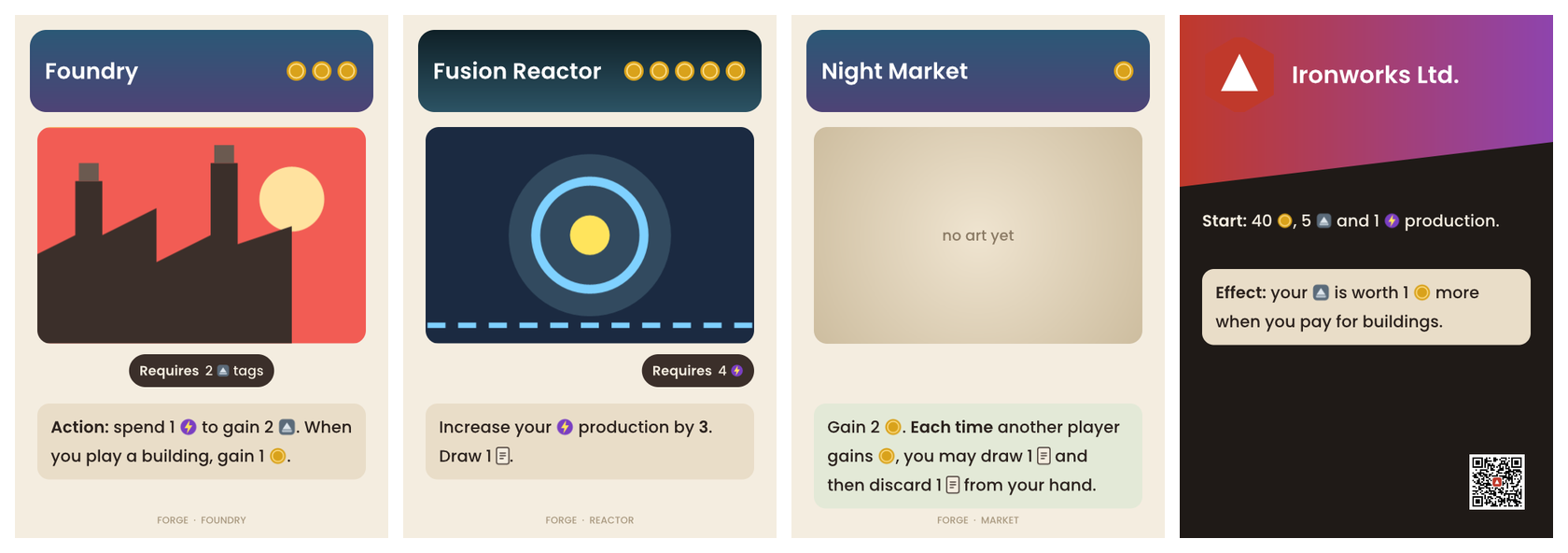
Text with icons, bold and italic
With "markup": true, card text can hold <b>, <i> and inline icons. Icons come from the design's icons and wrap with the word they belong to.
"icons": "assets/icons/*.svg",
"layers": [
  { "id": "effect", "type": "text", "markup": true, "text": "{effect}",
    "at": { "x": 40, "y": 600 }, "wrap": 420, "size": 22 }
]
{ "id": "foundry", "effect": "<b>Action:</b> spend 1 {icon:energy} to gain 2 {icon:steel}" }Details: text: bold, italic and icons, Designs: icons.
Text that fits
Text wraps, justifies, shrinks until it fits its box and cuts off with an ellipsis after a number of lines. Details: text.
Rows and columns
A group with layout places its children one after another by their measured size. A row of cost coins, or a pill around a text of any length, needs no arithmetic.
{
  "id": "cost", "type": "group",
  "layout": { "direction": "row", "gap": 8, "x": 460, "y": 76, "align": "end", "cross": "center" },
  "layers": [
    { "id": "coin", "type": "image", "src": "assets/icons/gold.svg",
      "repeat": { "count": "cost" }, "box": { "x": 0, "y": 0, "w": 28, "h": 28 } }
  ]
}
Details: group: rows and columns.
Gradients
Linear and radial gradients fill rect, ellipse and polygon layers. Colours can come from params, so every card can have its own.
"gradient": { "type": "linear", "angle": 90, "stops": ["header_top", "header_bottom"] }Details: rect: gradient.
Images: SVG, clipped, optional
Image layers load PNG, JPEG, WebP, GIF, BMP and SVG. SVG stays sharp at any size. radius rounds the corners, clip cuts the picture to a polygon, and "optional": true hides a missing picture instead of reporting an error, so a placeholder can show through.
{ "id": "art", "type": "image", "src": "{art}", "optional": true,
  "radius": 16, "box": { "x": 30, "y": 150, "w": 440, "h": 290 } }
Details: image.
Shared components
Layers that several designs share live in one component file. A group takes them with include.
{ "id": "effects", "type": "group", "include": "components/effect-row.component.json",
  "translate": { "x": 30, "y": 520 } }
Details: group: shared components.
QR codes
A qr layer turns a text into a code, with a logo in the middle if you like. yoshida warns when the code would print too small to scan.
{ "id": "rules", "type": "qr", "text": "{rules_url}", "level": "high", "logo_src": "{logo}",
  "box": { "x": 388, "y": 588, "w": 74, "h": 74 } }
Details: qr.
Formulas
Almost every field takes an expression instead of a fixed value: arithmetic, conditions, text, list, date and colour functions, and the measured size of other layers.
"fill": "cost > 3 ? #C0392B : accent",
"box": { "x": "@title.bounds.right + 12", "y": "10%", "w": "50vw - 40", "h": 48 }
Details: Expressions, Functions.
Repeat and extends
repeat draws a layer once per number or list item: stars for a level, one line per ingredient, forty tiles of a board. extends starts a layer from another one and changes only what differs.
{ "id": "pip", "type": "ellipse", "repeat": { "count": "level", "index": "i" },
"box": { "x": "40 + i * 34", "y": 40, "w": 24, "h": 24 }, "fill": "#F5C542" }Output: PNG, PDF, SVG and deck sheets
# one PNG per card
yoshida render my-game --out out
# one print PDF per set
yoshida render my-game --out out --pdf --crop-marks
# one SVG per card
yoshida render my-game --out out --svg
# one deck image per set, for tabletop simulators
yoshida render my-game --out out --sheet 10x7
canvas.dpi and canvas.bleed in the design make the files print ready. The editor exports PNG, ZIP and PDF with the same options, and deck sheets from its export dialog. Details: Command Line, Builder.
Errors that help
yoshida check and the editor's Problems panel report every problem with its file, line, column, a code and often a hint such as "did you mean title?". Details: Diagnostics.