

Example: Poker Deck
On this page
examples/poker is a complete deck of playing cards: 52 cards, two jokers (one red, one black) and a card back. It shows how one project uses several designs, and how extends keeps a design short when many layers are variations of one.
yoshida check examples/poker
yoshida render examples/poker --out out --date 2026-10-11
# wrote out/numbers/AS.png (750 x 1050)
# ...
# wrote out/back/back.png (750 x 1050)
yoshida render examples/poker --out out --pdf   # one PDF per set
yoshida render examples/poker --out out --sheet 10x7   # one deck image per set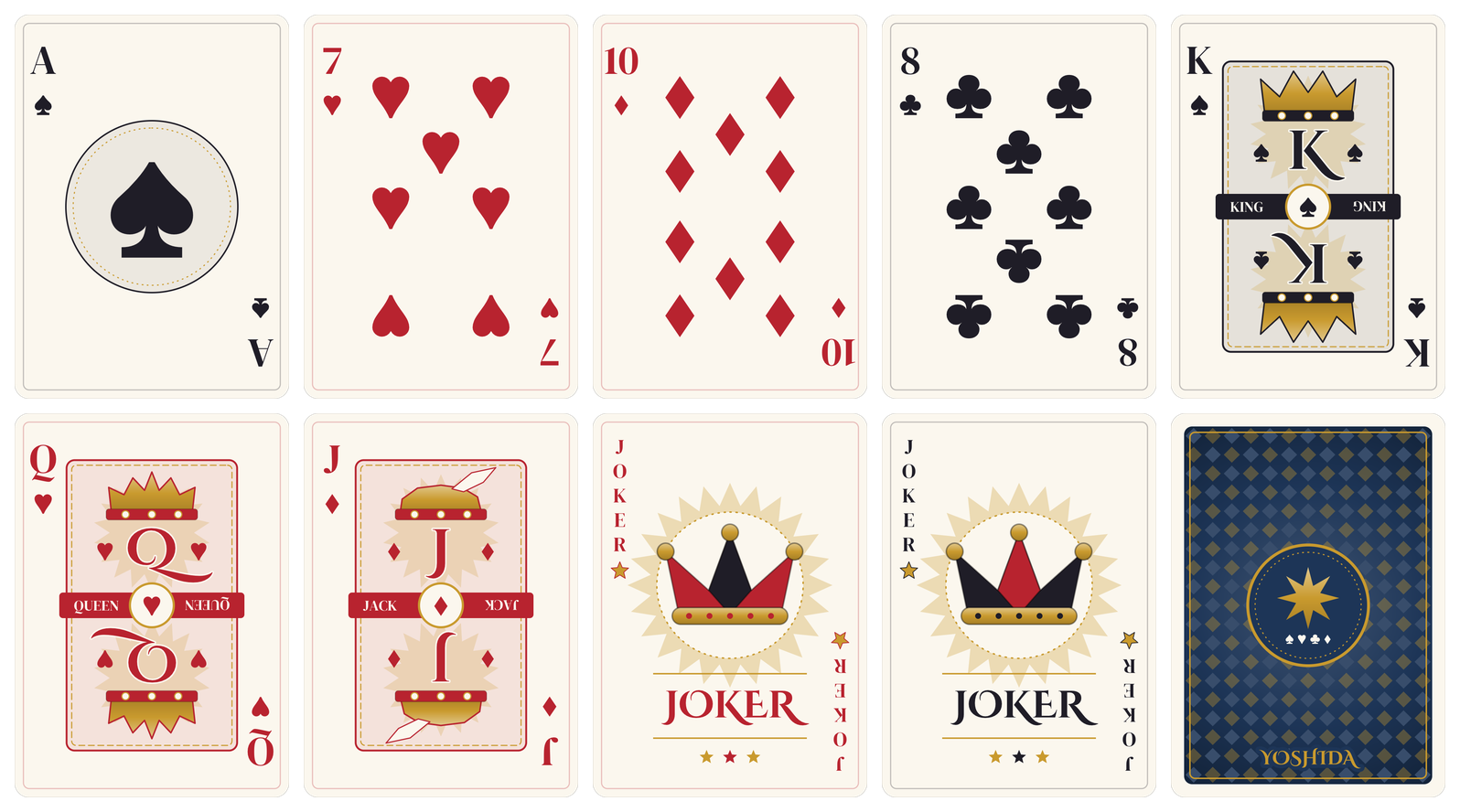
Files
poker/
  yoshida.json                    the four sets, in deck order
  designs/number.design.json      ace to 10
  designs/court.design.json       jack, queen, king
  designs/joker.design.json
  designs/back.design.json
  cards/numbers.cards.json        40 cards: AS, 2S ... 10C
  cards/courts.cards.json         12 cards: JS, QS, KS ... KC
  cards/jokers.cards.json         joker-red, joker-black
  cards/back.cards.json           back
  assets/fonts/DMSerifDisplay-Regular.ttf, CinzelDecorative-Bold.ttf (OFL)
Each card is 750 x 1050 px at "dpi": 300, which is the usual poker size of 63.5 x 88.9 mm (2.5 x 3.5 in). The corners are transparent.
Several designs in one project
Number cards, court cards, the joker and the back look different enough that one design with many visible switches would be hard to read. Instead each kind of card has its own design, and each card file names the design it uses:
{ "format": 1, "design": "designs/court.design.json", "name": "Court cards", "cards": [
  { "id": "JS", "rank": "J", "suit": "spades" },
  { "id": "QS", "rank": "Q", "suit": "spades" }
] }
JSON card files do not need a manifest, but yoshida.json lists the four sets so they get short names (numbers, courts, jokers, back) and render in deck order. In the editor, the Design picker in the toolbar switches between them. The designs share their look by using the same params (paper, red, black, gold) and the same layer names for the card face and frame; a design cannot extend layers of another design. Layers that should be edited once for several designs can live in a shared component, as the effect panel of the forge example does.
extends for mirrored corners
Every face card has its index twice: top left, and turned upside down at the bottom right. The bottom-right layers extend the top-left ones and only change the position and the turn, so a change to the font, size or text applies to both corners:
{ "id": "index_rank", "type": "text", "text": "{label(rank)}", "at": { "x": "index_x", "y": "index_y" },
  "anchor": "top", "font": "serif", "size": 112, "max_width": 104, "color": "ink" },
{ "id": "index_rank_br", "type": "text", "extends": "index_rank",
  "at": { "x": "canvas.w - @index_rank.at.x", "y": "canvas.h - @index_rank.at.y" }, "rotate": 180 }
Text turns around its at point, so a top anchor at the mirrored point puts the turned text exactly in the opposite corner.
Pips from functions
The number design has one hidden pip layer with the suit symbol, its size and color. Three layers extend it: pips_side (the left and right columns), pips_mid (the middle column) and ace_pip (one large pip). Design functions decide how many pips each rank has and where they go, from 0 (top row) to 1 (bottom row):
| Function | What it gives |
|---|---|
side_n(r) | Pips per side column: 0 for A to 3, 2 for 4 and 5, 3 for 6 to 8, 4 for 9 and 10 |
mid_n(r) | Pips in the middle column: 2 for 2, 3 for 3, 1 for 5, 7 and 9, 2 for 8 and 10 |
side_t(r, i), mid_t(r, i) | Height of pip i, from 0 to 1 |
pip_y(t) | That height in pixels, between the pip_top and pip_bottom constants |
flip(t) | 180 for pips below the middle, so they point down as on a printed deck |
{ "id": "pips_side", "type": "text", "extends": "pip", "visible": true,
  "repeat": { "count": "side_n(rank) * 2", "index": "i" },
  "at": { "x": "i % 2 == 0 ? col_l : col_r", "y": "pip_y(side_t(rank, i))" },
  "rotate": "flip(side_t(rank, i))" }
glyph(suit) picks ♠ ♥ ♦ ♣ and the ink constant picks red or black. The serif font has no suit symbols, so they come from the bundled symbol font.
Double-ended court cards
The portrait on a jack, queen or king is one group, figure, repeated twice. The second iteration is moved to the lower half and turned 180 degrees with "rotate": "half_i * 180". A group turns around the centre of its bounds, so the first layer in the group, figure_box, is an invisible rect centred on the group's origin: it keeps the bounds centred, and the turned half lines up with the first one. The crown is one of three polygons, shown by "visible": "rank == 'K'" and so on, filled with a three-stop gold gradient instead of a flat color. The banner's name is title when a card sets it, otherwise King, Queen or Jack.
The joker and the back
- Joker: the vertical index is one text with
\nbetween the letters and a negativeline_spacing; a 24-point starshapebehind a dashed ring; the jester cap is a group withtranslate, so its polygon points are relative to the cap's centre.tone(red or black) swaps the two main colors. - Back: a nested repeat, one group per row and one diamond per column, sized from the
colsandrowsconstants so the lattice fills the field exactly.(r + c) % 2alternates the two diamond colors. The field behind it is a radial gradient that darkens towards the corners.coloranddeck_namechange the whole back.
Ideas to try
- Change
red,black,paperorgoldin a design's params to recolor the deck, orcoloron the back. - Set
titleon a court card ("title": "Charlemagne") to name it. - Make a smaller bridge-size deck: change
canvas.widthto 675 and movecol_l,col_rand the pip constants.